8.2 Harmonize names
Research datasets often use inconsistent Series Description text. Harmonize suggests a standard name from anatomy and (for CT/MR) contrast — RSNA Radiology Playbook / RadLex style. It does not change pixels.
Demo series
| Fixture | Path under tests/controller/assets/test_dcm_files/ |
What it shows |
|---|---|---|
CT_Head_With_Contrast |
CT_Head_With_Contrast |
CT path: TotalSegmentator anatomy / contrast, brain-structures prompt, overlays |
davidson_cxr |
davidson_cxr |
XR planar path: optional Xp-Bodypart + CXp-Projection-Rotation |
us_rgb_single_frame |
us_rgb_single_frame |
US planar path: DICOM metadata only (no TotalSegmentator) |
Import a series, open it in Series View, then run Harmonize. Reuse CT_Head_With_Contrast in 8.3 Blur faces.
Goal
- On
CT_Head_With_Contrast: run Harmonize Description, answer the brain-structures prompt when offered, Apply, then review segmentation overlays on the middle slice. - On
davidson_cxrandus_rgb_single_frame: run Harmonize and read the Playbook table — Source names the model or DICOM (same idea as CT’s “TotalSegmentator anatomy”).
Before you start
- Complete AI Features setup — Harmonize CT pack, resolution, and Brain structures for the CT demo.
- Optionally download XR body part and XR chest view so the CXR demo shows pixel fusion (without them, XR still Harmonizes from DICOM tags).
- Import the demo series (Search) and open each in Series View (View — right-click the series row).
Workflow on CT_Head_With_Contrast
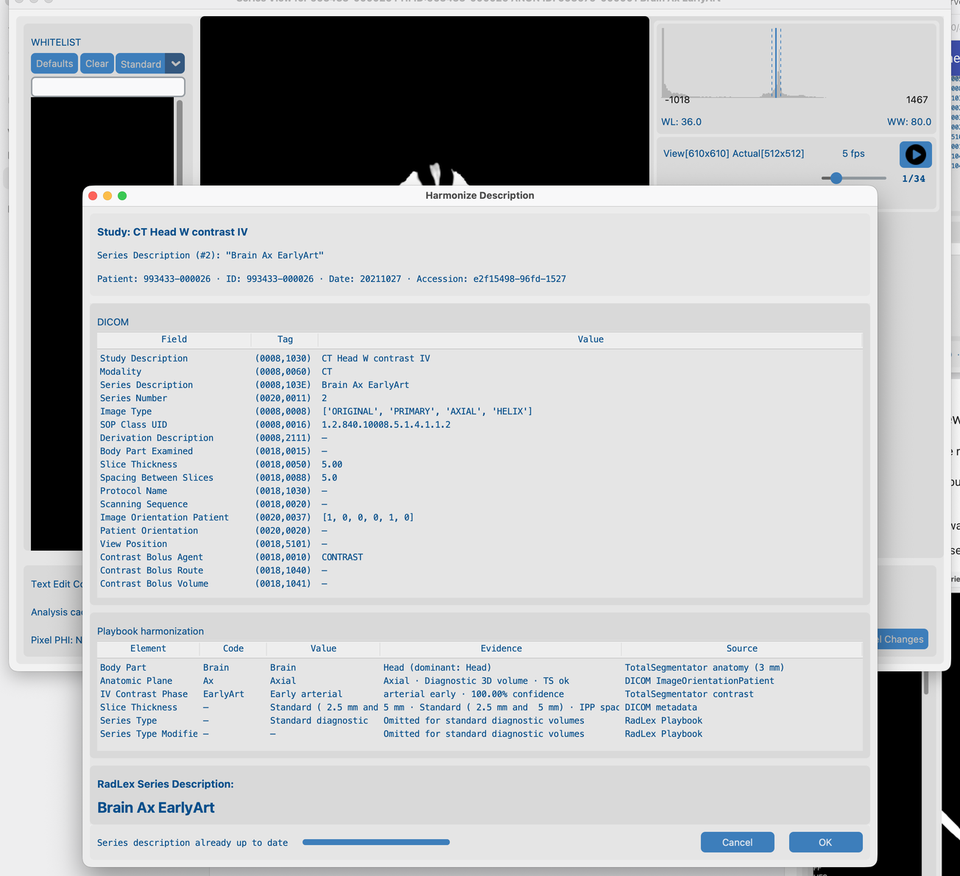
1. Harmonize Description (from Series View)
- With
CT_Head_With_Contrastopen in Series View, click Harmonize Description. - Wait until analysis finishes — the Playbook harmonization table fills with anatomy / contrast evidence (not an empty table mid-progress).
- Review the suggested Series Description, then Yes to apply, or No / Cancel.
The Series View remains behind the dialog so you keep context for the open series.
2. Brain structures prompt
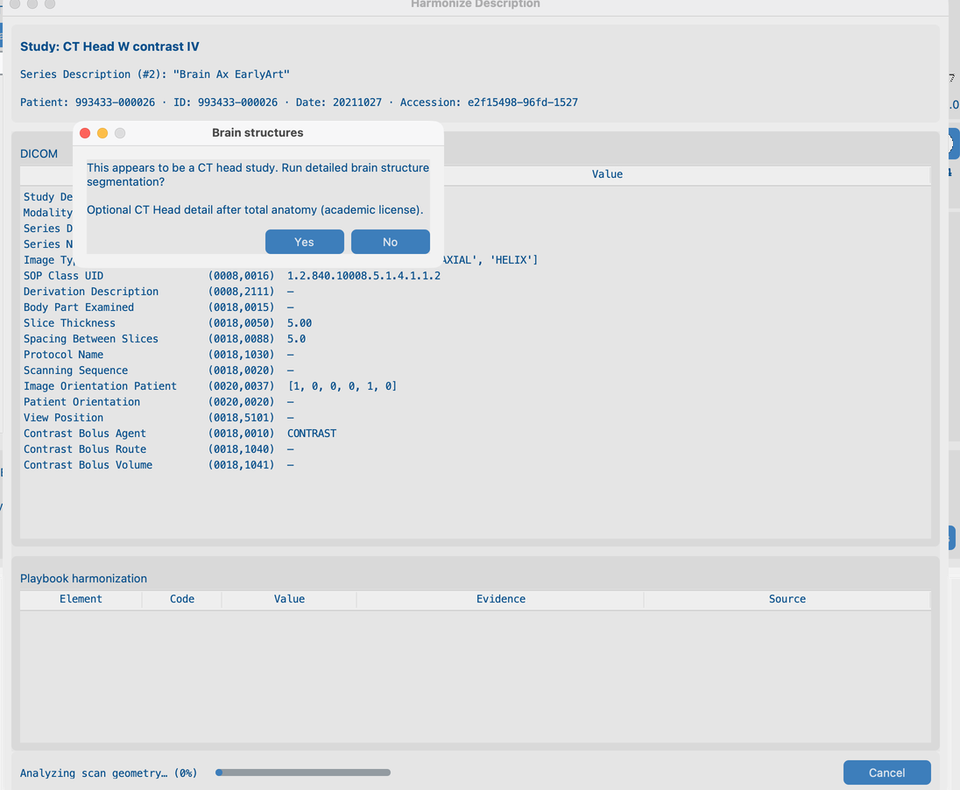
On a CT head series, Harmonize asks whether to run detailed brain structure segmentation before the job continues:
- Read the Brain structures Yes/No message (academic license / models required — see AI Features).
- Choose Yes to include brain structures in this run, or No for standard anatomy only.
3. Segmented Series View
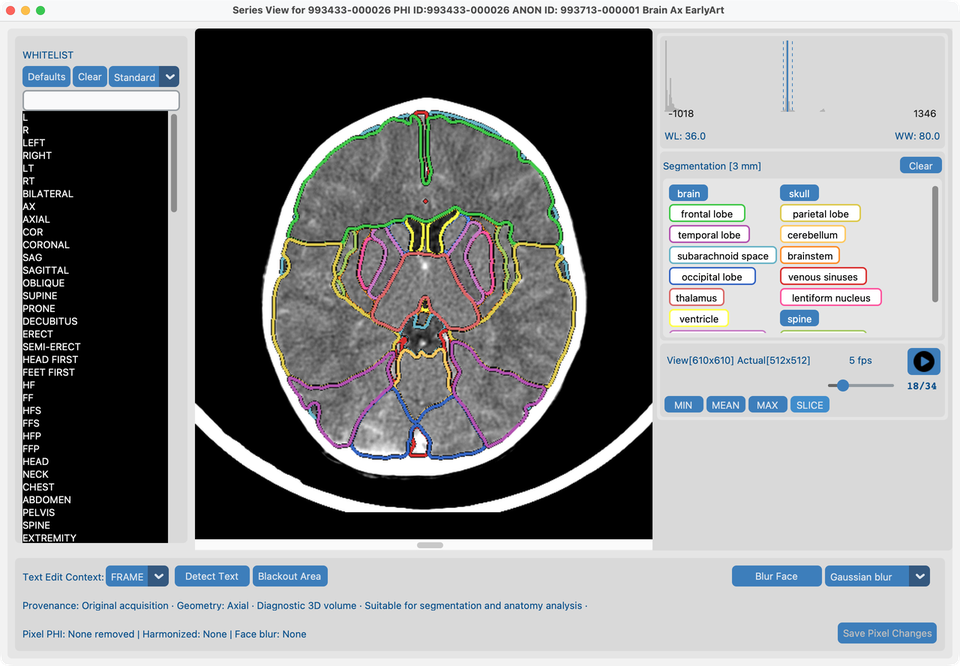
After you Accept a Harmonize run that included brain structures (Yes on the prompt):
- Series View shows latch buttons for whole brain plus detailed structures (brainstem, lobes, ventricles, …) when the licensed pack ran.
- Select all structures you want to review (including brain).
- Go to the middle slice to see overlays on a representative frame.
Planar Harmonize (XR and US)
CR/DX, ultrasound, and mammography use a separate Harmonize path from CT/MR: no TotalSegmentator, no thickness/contrast buckets. The Playbook table still uses Evidence (what was measured) and Source (where it came from).
Chest X-ray (davidson_cxr)
- Open
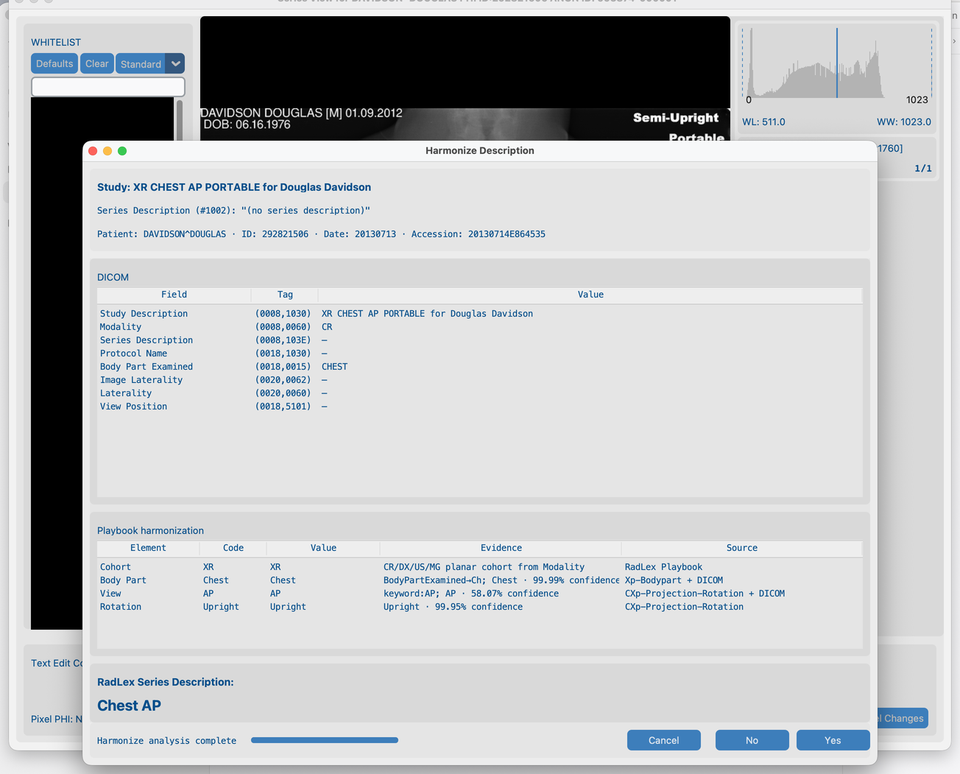
davidson_cxrin Series View → Harmonize Description. - When XR models are installed, Body Part Source is Xp-Bodypart (or fused with DICOM); View / Rotation use CXp-Projection-Rotation when anatomy is Chest.
- Evidence looks like CT classifier rows — e.g.
Chest · 99.00% confidence— not opaquepixel:…tokens. - Rotation is analysis-only; SeriesDescription stays e.g.
Chest AP/Chest Lat.
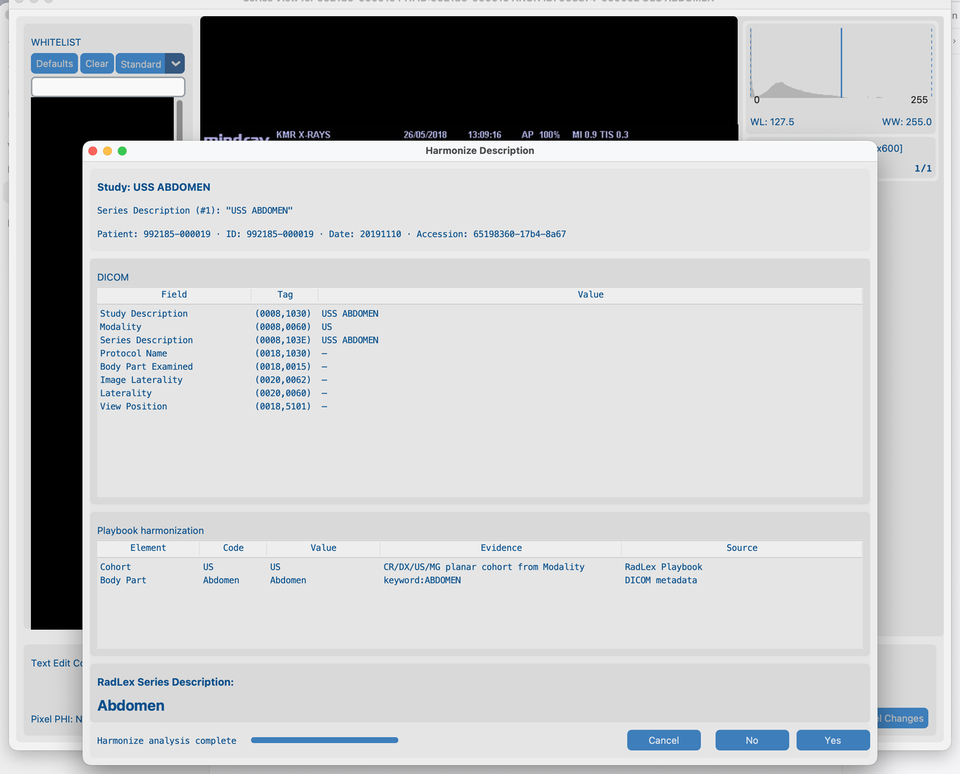
Ultrasound (us_rgb_single_frame)
- Open
us_rgb_single_framein Series View → Harmonize Description. - Cohort / body part / mode come from DICOM tags and keywords; Source is DICOM metadata or RadLex Playbook.
- No XR pixel packs and no TotalSegmentator run on US.
Notes (same as production use)
- Scouts, MIP/VR, dose reports, and similar series are usually skipped.
- CT: anatomy segmentation + contrast phase when models allow (TotalSegmentator).
- MR: anatomy from MR packs; IV contrast from DICOM headers (TotalSegmentator).
- XR (CR/DX): planar Harmonize; optional Xp-Bodypart + chest-only CXp view/rotation (soft downloads).
- US / MG: planar Harmonize from DICOM only — no TotalSegmentator and no XR pixel packs.
- SC / OT / DOC: Harmonize is not offered.
- After all series in a study are harmonized, the best LOINC study description is applied automatically (same path as AI Batch). Change it later from Dataset. Pure XR/US/MG studies use the matching LOINC prefix.
- In Dataset, double-click a study or series description (or multi-select and right-click for Set description) to pick LOINC (study) or RadLex (series) names — including for rows not yet green. Single-click only selects the row.
- Results cache under the series folder — Clear Analysis Cache for a fresh CT/MR run.
- Batch: 8.4 Run on many studies (resolution comes from AI Features, not per batch).
What good looks like
- CT: SeriesDescription looks consistent for this head CT; Dataset Harmonized updates; after brain Yes, latch overlays draw on the middle slice.
- CXR: Playbook Source names Xp-Bodypart / CXp-Projection-Rotation (or DICOM) with readable confidence evidence.
- US: Playbook rows cite DICOM metadata / RadLex Playbook; suggested name matches ultrasound anatomy/mode.
If it fails
- Not suitable series → expected skip.
- Already harmonized → Clear Analysis Cache to re-run.
- Models not ready → AI Features.
Next steps
Continue with 8.3 Blur faces on the same CT_Head_With_Contrast series (Gaussian).