AI Features setup
AI Features are optional. They run on your computer after a one-time download. Images are not uploaded for processing.
Do this chapter before the tool walkthroughs on davidson_cxr and CT_Head_With_Contrast.
Goal
Download the models you need and choose Harmonize resolution for this workstation.
Open setup
From the Welcome screen only: click AI Features.
Close the project (or start the app) to return to Welcome if you need to download models or change Harmonize resolution later.
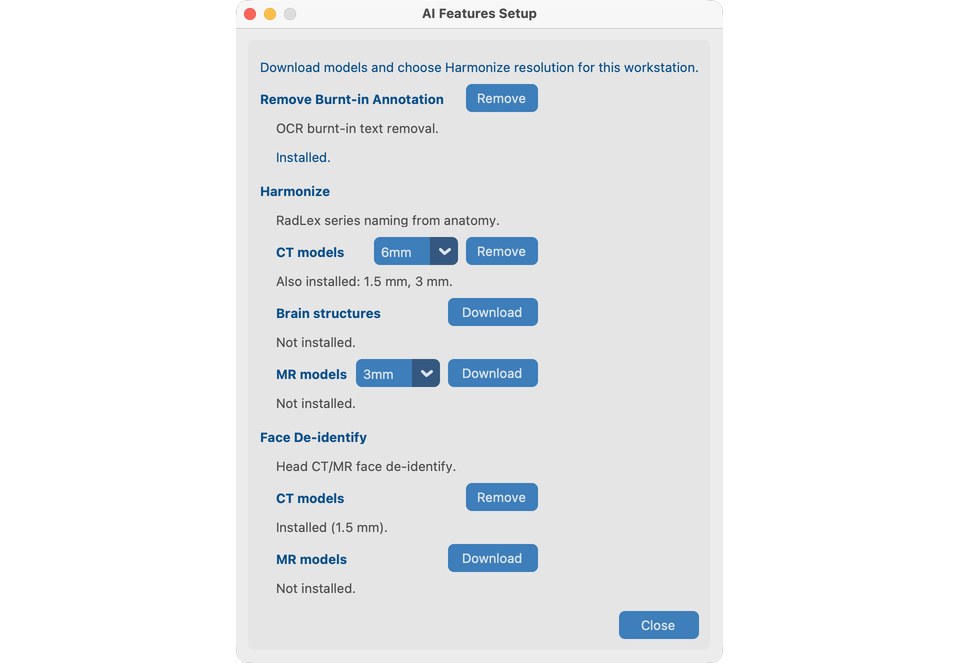
What you configure (V19)
| Item | Needed for demo |
|---|---|
| Remove burned-in text (OCR) | Chapter 8.1 — davidson_cxr |
| Harmonize CT pack + resolution (1.5 / 3 / 6 mm) | Chapter 8.2 — CT_Head_With_Contrast |
| Harmonize XR body part (optional) | Pixel anatomy for CR/DX when DICOM body-part tags are missing or wrong |
| Harmonize XR chest view (optional) | Pixel AP/PA/Lat (+ rotation QC) for chest CR/DX |
Face de-identify + academic license aca_… |
Chapter 8.3 — CT_Head_With_Contrast |
| Brain structures (optional licensed pack) | Chapter 8.2 — Harmonize brain-structures prompt |
There are no project on/off checkboxes. If models are installed and ready, tools appear in Series View and batch.
XR Harmonize works without the XR body-part or chest-view packs (DICOM tags / keywords only). When installed, CR/DX series can use:
- EfficientNet-B4 body-part classifier (Xp-Bodypart-Mislabel-Checker; Mitsuyama et al., European Radiology 2025), fused with DICOM anatomy.
- Chest-only projection/rotation classifier (CXp-Projection-Rotation-Mislabel-Checker) to refine AP/PA/Lat; rotation is shown in the Harmonize analysis table and is not written into SeriesDescription.
Mammography and ultrasound do not use these models.
First-time steps
- Open AI Features.
- Download Remove burned-in text, Harmonize (CT), and Face de-identify.
- Enter or validate the academic license when prompted (face / brain structures).
- Choose Harmonize CT resolution; download if the pack is missing.
- Optionally download Brain structures for the CT Harmonize demo, and XR body part / XR chest view for the CXR Harmonize demo in chapter 8.2.
- Close the dialog. Preferences stay on this workstation.
Internet only for download
After models and license are in place, processing is local. On macOS, install the OpenMP C++ library before using Harmonize / related AI Features: brew install libomp (see Install).
Remove models
Use Remove on a tool card to delete downloaded files. This does not undo changes already written to anonymized images.
What good looks like
- Status shows ready for OCR, Harmonize CT, and Face.
- You can open Series View tools on the demo series in Process chapters 8.1–8.3.
If it fails
- Download incomplete → check network and retry.
- TotalSegmentator / OpenMP on macOS →
brew install libomp. - License invalid → check
aca_format or the vendor URL in the dialog.
Next steps
- Words we use and Create a project, or
- Jump to Process tools once you have imported studies — start with 8.1 Remove Pixel PHI